¶ WastelandRP Chat System
Wasteland has its very own custom in-house chat system with many features. In this guide, you’ll learn how to use them to engage in your role play adventures. When in doubt, use the /help command in-game. It will give you a list of the majority of the chat commands you have at your disposal. This page will go more in depth on how and when to make use of the various options.
Chat Commands:
There are multiple options in the chat system that determine the reach of your chat input. You should familiarize yourself with these and use the appropriate option for a given situation. If you’re speaking in a hushed tone meant only for the recipient, the /whisper command is the ideal option. If you are speaking openly, then /say is apt. Range and mode commands can generally be combined. An example would be using “/mes” or “/meshout” to do an emote with the range of a shout.
On the chatbox, in the upper right hand corner, there is a button that resembles a broadcasting signal. Clicking it will display the range of the selected Range Command. It will flash three times, brightening and darkening the tiles that are within range of the message. There is also a keyboard icon beside it that will remove the notification that you are typing in the chatbox to others. In general, it's helpful to keep this on so that other players know you're trying to communicate with them, but at times it is useful to shut it off.
Range Commands:
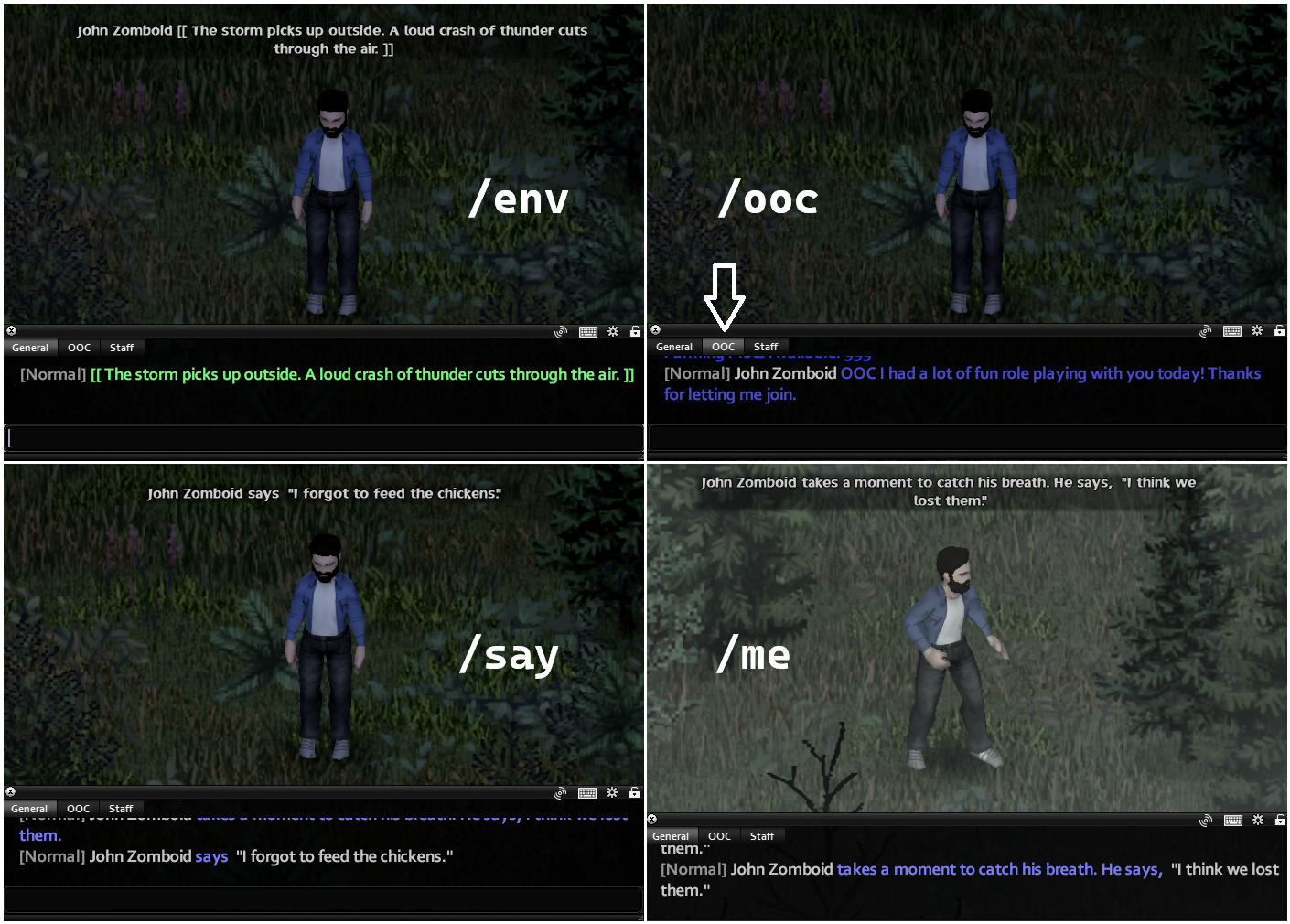
Range commands can be used to speak in plain dialog, or combined with a mode command. Typing “/say I forgot to feed the chickens.” will result in the message appearing:
Yourname Here says, “I forgot to feed the chickens.” Anyone within 10 squares will see this message.
The various commands for chat range:
- /whisper ( /w ) - The message is visible to others up to 1 square away.
- /low ( /l ) - The message is visible to others up to 5 square away.
- /say - The message is visible to others up to 10 square away. This is the default range.
- /loud ( /yell, /y ) - The message is visible to others up to 30 square away.
- /shout ( /s ) - The message is visible to others up to 50 square away.
Mode Commands:
Mode commands alter how your message will appear in the chat box, or maybe even which tab it shows up in. If they are used without a Range Command, they will default to say range, which is 10 squares. To use a different Range command, always use the Mode Command first.
Example: “/meshout” or “/mes” will broadcast your emoted message 50 squares in every direction from the one you occupy.
- /me ( /m ) - Used to denote the actions that your character takes.
- /me takes a moment to catch his breath. He says, “I think we lost them.”
- /env ( /e ) - Used to describe an environment. Appears in green text.
- /env The storm picks up outside. A loud crash of thunder cuts through the air.
- /ooc ( /o ) - Used to communicate out of character in the OOC chat tab.
- /ooc I had a lot of fun role playing with you today! Thanks for letting me join.
Do not use /env for OOC chatter. Misusing this command can land you in a staff ticket.
¶ Languages
Some languages grant partial fluency with others and some even grant full fluency. If a language has root similarities to another that you know, you will likely be able to understand about 10% of the spoken words. For example, if you speak Italian, then each word spoken by someone using the Spanish, Romanian or Portuguese languages will have a 10% chance of being revealed to you in the chat log. Languages that are extremely similar will grant full fluency with one another. Anyone who speaks Dutch can understand German, for example.
¶ Available Languages:
Afrikaans (af), Albanian (al), American Sign Language (asl), Apachean (apa) Arabic (ar), Bengali (bn), Bhojpuri (bho), Bosnian (bo), Bulgarian (bg), Chinese (zh), Croatian (hr), Czech (cs), Danish (da), Dutch (nl), English (en), Esperanto (eo), Estonian (et), Farsi (prs), Filipino (fi), Finnish (fn), French (fr), Gaelic (ga), German (de), Greek (el), Gujarati (gu), Hausa (ha), Hawaiian (hw), Hebrew (he), Hindi (hi), Hungarian (hu), Icelandic (is), Indonesian (id), Inuit (inu), Iranian Persian (fa), Iroquoian (iro), Italian (it), Japanese (ja), Javanese (jv), Korean (ko), Latin (la), Latvian (lv), Lithuanian (lt), Malay (ms), Marathi (mr), Muskogean (mus), Na-Dene (nad), Nigerian Pidgin (pcm), Norwegian (no), Polish (pl), Portuguese (pt), Romanian (ro), Russian (ru), Sehaptian (sah), Salish (sal), Serbian (sr), Sinhala (si), Siouan (sio), Slovak (sk), Slovenian (sl), Spanish (es), Swahili (sw), Swedish (sv), Tagalog (ta), Tamil (tam), Telugu (te), Thai (th), Turkish (tr), Ukrainian (uk), Urdu (ur), Uto-Aztecan (uto), Vietnamese (vi), Welsh (cy), Western Punjabi (pnb), Yiddish (yi)
¶ How To Use Another Language
You will need to put in a Language ticket on the discord to gain them on your character before you can use them in game!
There are a handful of different ways to use a desired language. You can designate a language using a Chat Command. This is done by typing /lang [code] into the chat box. The code for any given language can be found in the list above. Example:
- /lang yi - This will set your current language to Yiddish, if you know it.
Additionally, if you only want to use the designated language for a single message, you can modify your chat command to include the language code. Using Yiddish as an example, you would do so by adding :yi in front of your chat message. Examples:
- /say:yi “Hello! How are you?”
- /me:yi looks to the stranger and says, “Good Day!”
- meshout:yi shouts in Yiddish, “Have a good day!”
The final way to set a desired language is to click the cog icon in the top right of the chat box. Under Actions in the menu, you will see Choose Language. This will show you a list of all the languages your character knows, and allow you to select the one they will be speaking in.
¶ Learning Another Language
You learn new languages through a multi-week RP process with another RPer who already speaks that language. This is mostly player-driven, with just a quick check of your work at the end before you are granted the language. If your character wants to learn a new language, you need to take eight in-game months (approx. 2 IRL months) to do it.
¶ The Exact Requirements Are:
- At least 8 in-game months of RP screenshots at one screenshot per in-game month (so, 8 screenshots)
- At least four of those screenshots should be with another character who speaks the language (not just book learning)
- All study sessions should be at least three good-sized paragraphs of writing, or some good conversational back-and-forth with another player
¶ Examples:
Here is an example of how to start Learning A Language:
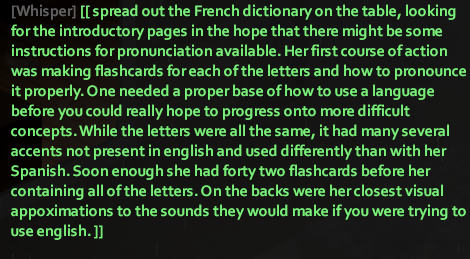
Here is an example of an acceptable Solo Study session:
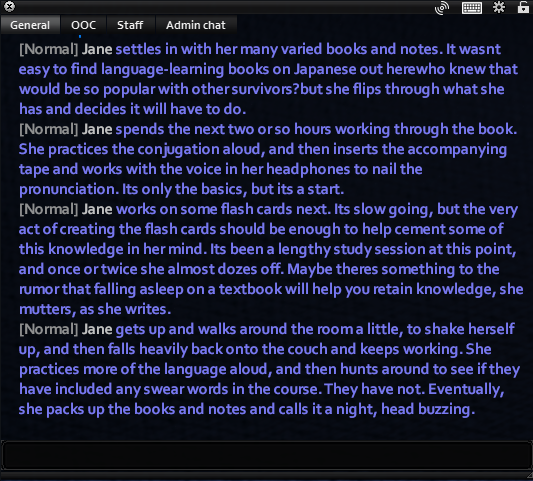
Here is an example of an acceptable "study session" with Another Player:
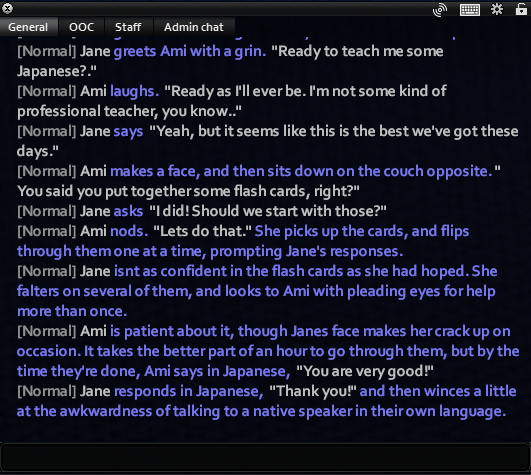
¶ So You Have All The Requirments
Once you are able to collect the screenshots that are needed for Learning A New Language You will need to open a In-Game Language Request Ticket and present what you have to the Staff who will look it over and make the choice on giving you the language or asking for more!